
Find the bottle you meant to buy again.
Your score, your notes, the maguey and the NOM sit together, so months later you have more to go on than a blurry photo.
Your score answers the useful question: would you pour it again?
Your tequila and mezcal journal
Log a pour in twenty seconds: the class, the maguey, the NOM, and what it actually tasted like. Your Shelf knows what is open, how much is left and what you paid. Your palate report shows how you really drink. And Tahona, your guide, has read it all. No expertise needed.
iPhone · Free journal · Optional Pro · Legal drinking age only
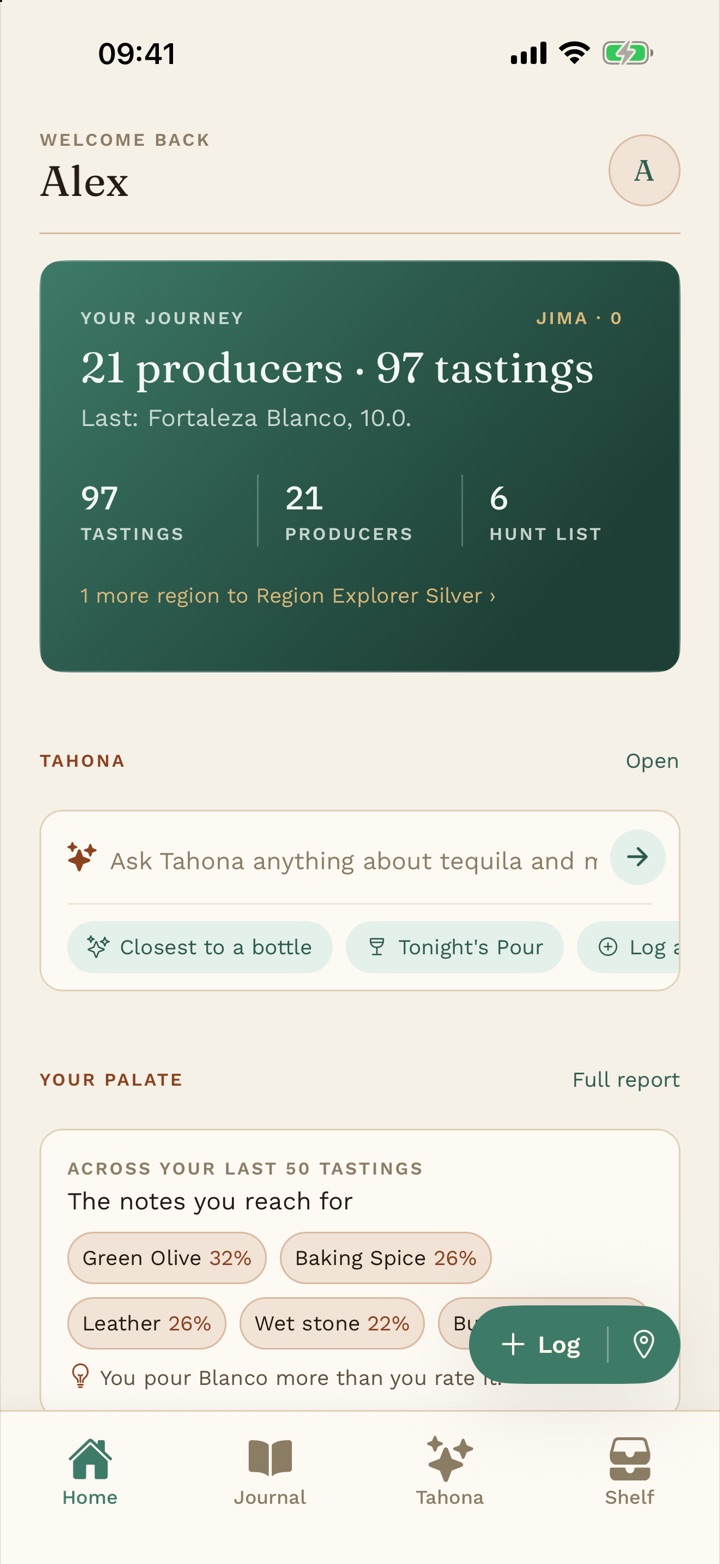
You poured something at a mezcaleria in October and gave it a nine. In February you are in front of a wall of bottles with no idea what it was called.
Agave & Note fixes that.
What it does
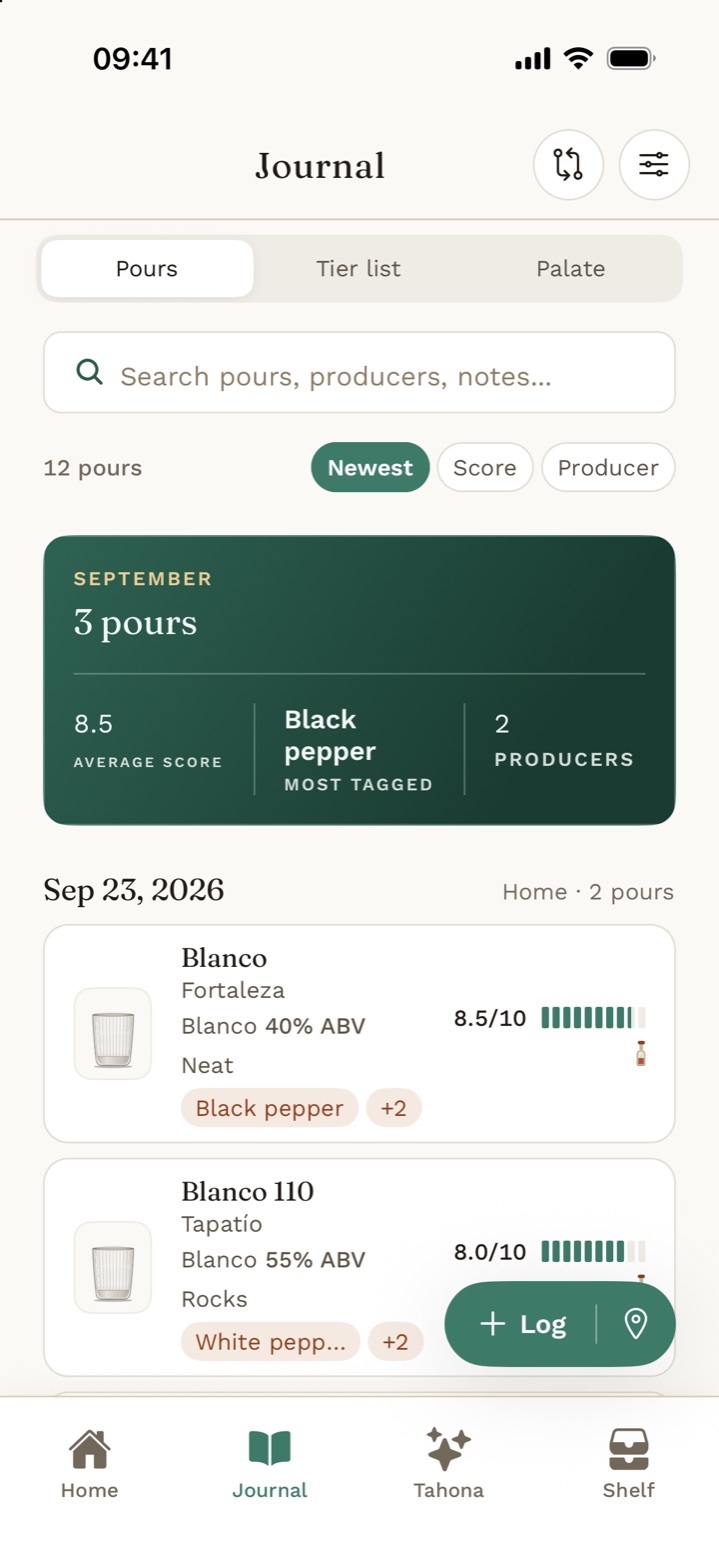
IThe journal
Pick the bottle, pick how you took it, score it out of ten in half points, tap a few flavours, done. Four pours at a bar is one tasting, not four chores. At home, open More detail and go as deep as you like.
IIHow it was made
Six production fields on every bottle, each optional: the class, how the agave was cooked, how it was crushed, what it fermented in, wild or cultured yeast, and the still. Every bottle has its own page, with your pours, what each one cost you and a way to ask Tahona about it.
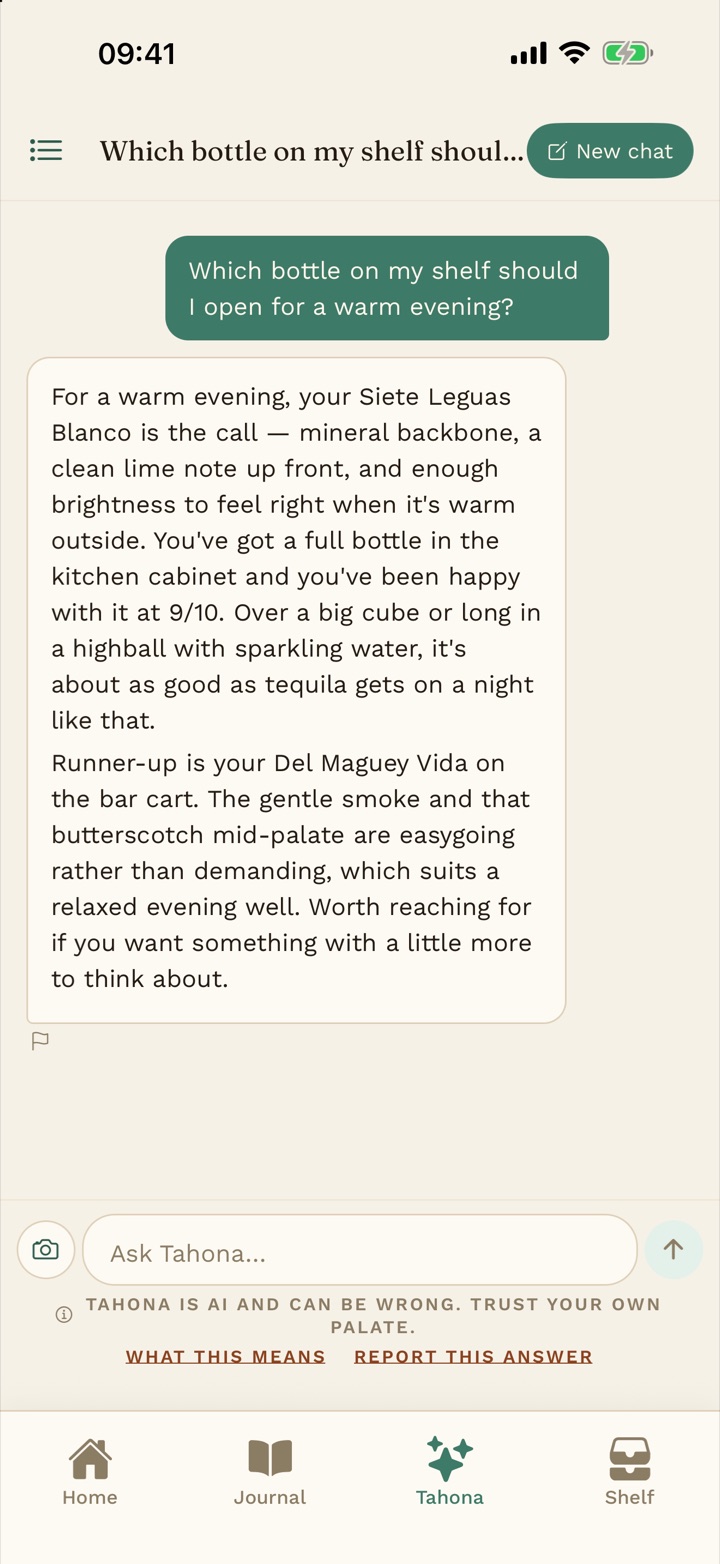
IIIAsk Tahona
Tahona is named after the stone wheel that crushes the agave. It answers from your own pours and your own Shelf, not a crowd average. Ask what to open tonight, what a word on the label means, or what to try next.
Ask it things like
Every question costs one AI credit, and you start with 10 free. Tonight’s Pour and flight plans cost three each, and Tahona can look a specific bottle up on the web with no extra charge. Tahona will not tell you whether a bottle contains additives, and it will not answer a medical question.
“What should I pour tonight?”
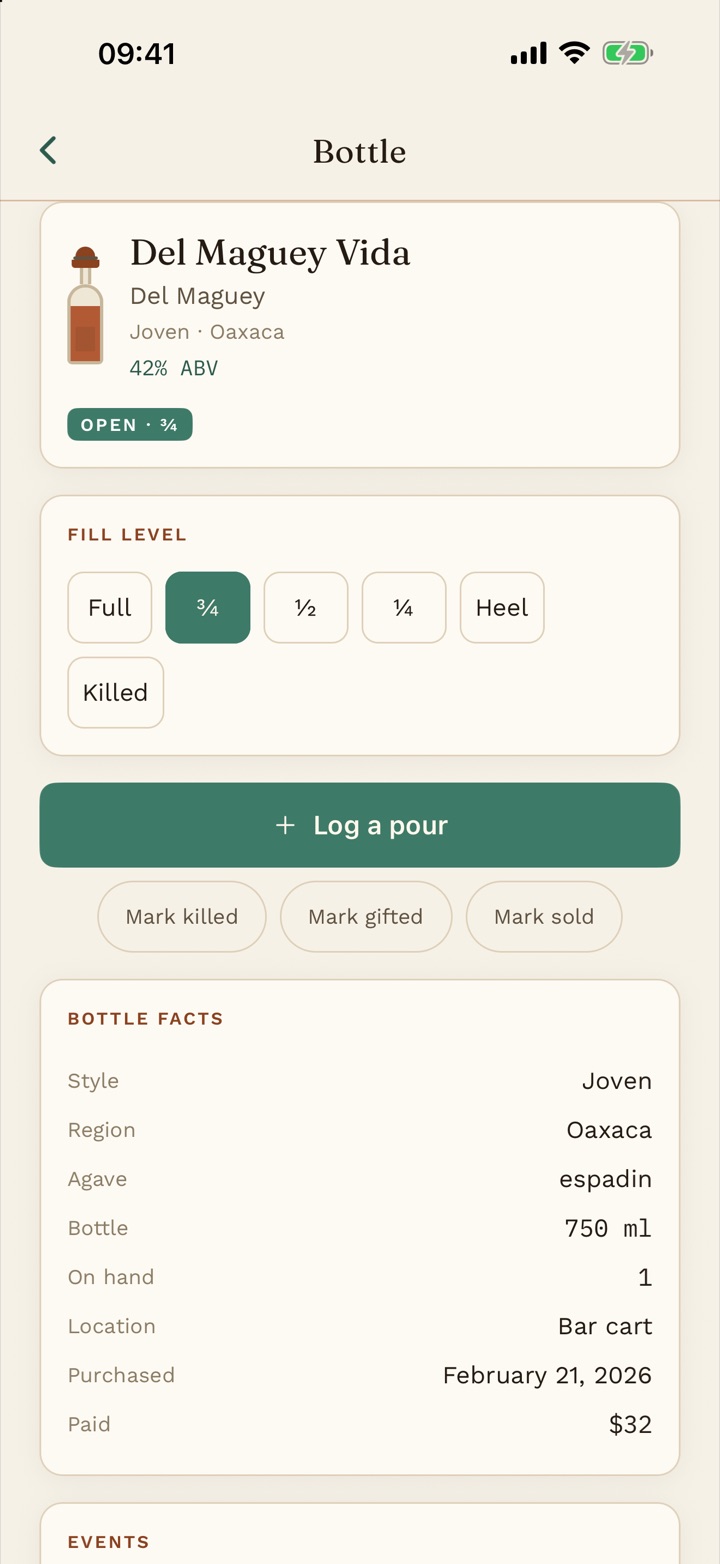
IVThe Shelf
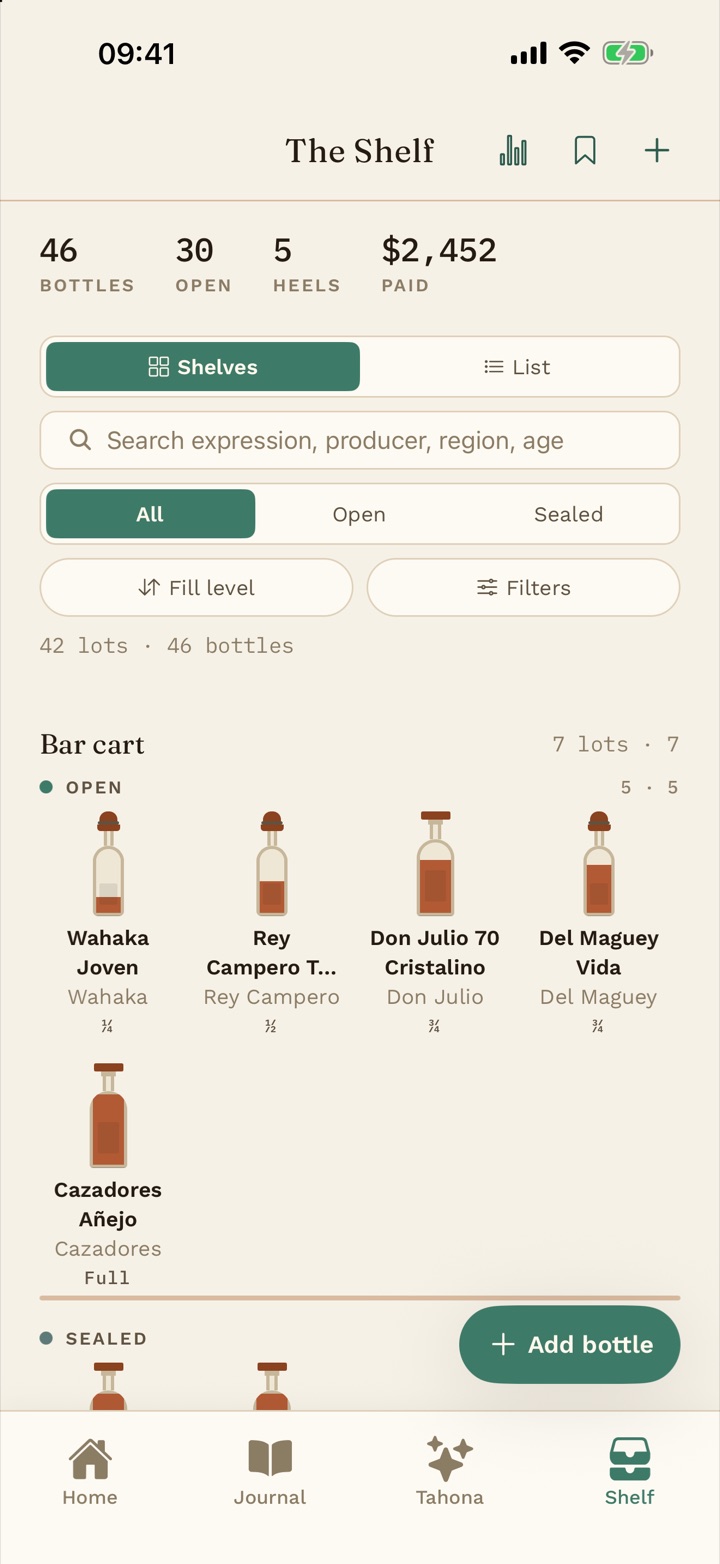
Every bottle at its real fill level. Sealed or open, what you paid, where you bought it, when you opened it, and every event since: opened, poured, killed, gifted, sold, restocked. See it as shelves or as a list, with your totals on top. No cap on bottles, on any plan.
VYour palate report
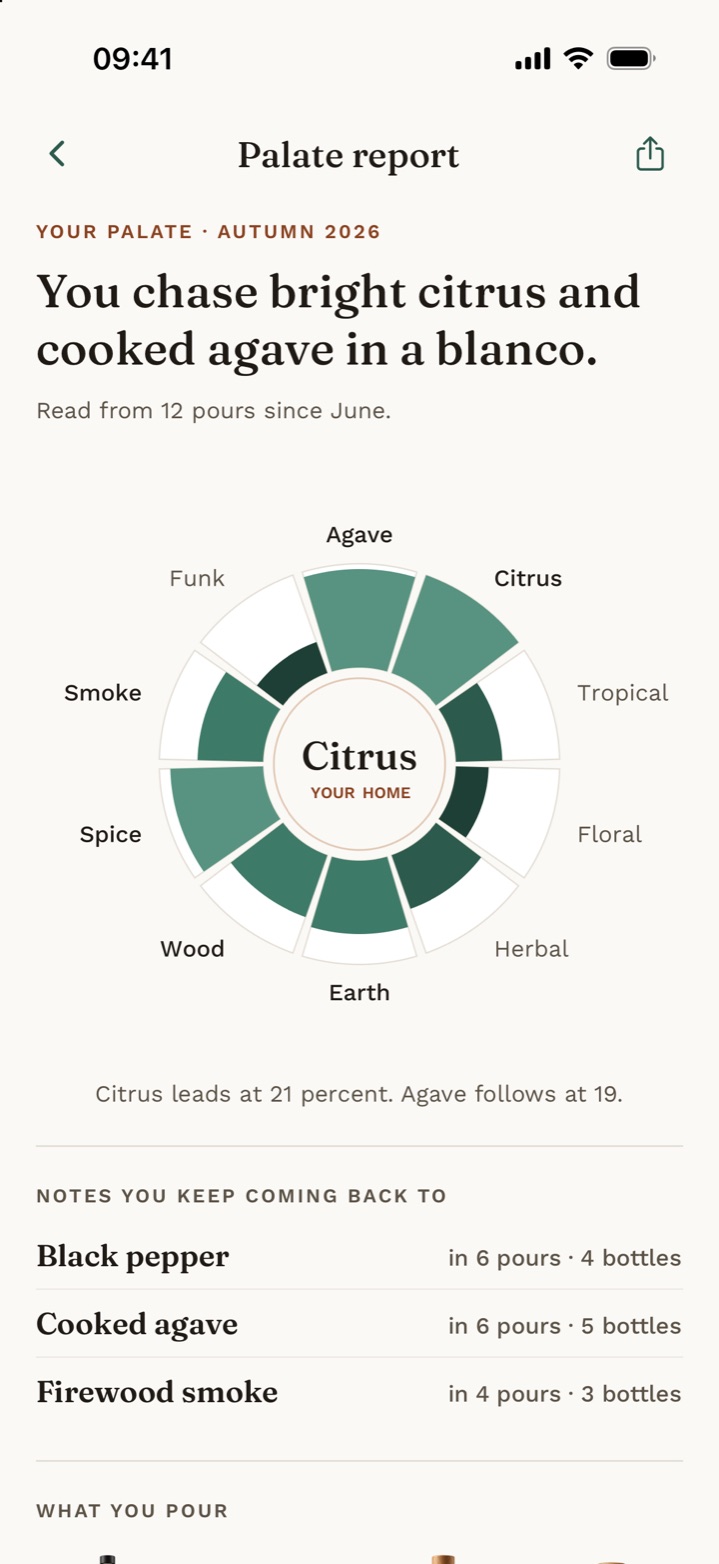
Log a dozen pours and the report reads them back to you: a flavor ring of the families you reach for, and one line that sums you up. Then the notes you keep coming back to and what you pour most. Share it as a card.
VIYour tier list
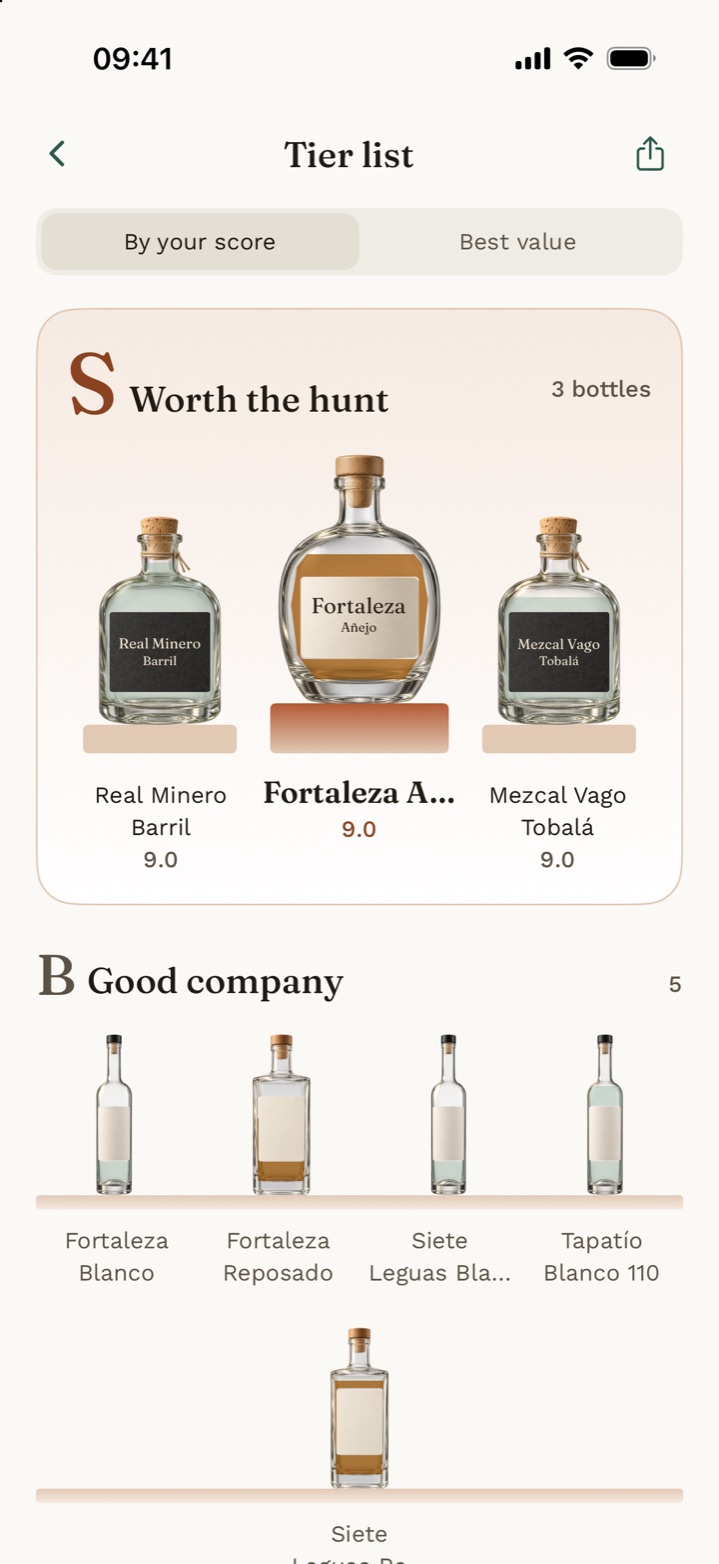
Every bottle you have scored, ranked into tiers. The top three stand on the podium, and the rest sit on shelves under tier names like Worth the hunt and Good company. Switch to Best value to rank what you got for the money.
VIIShelf insights and Empties
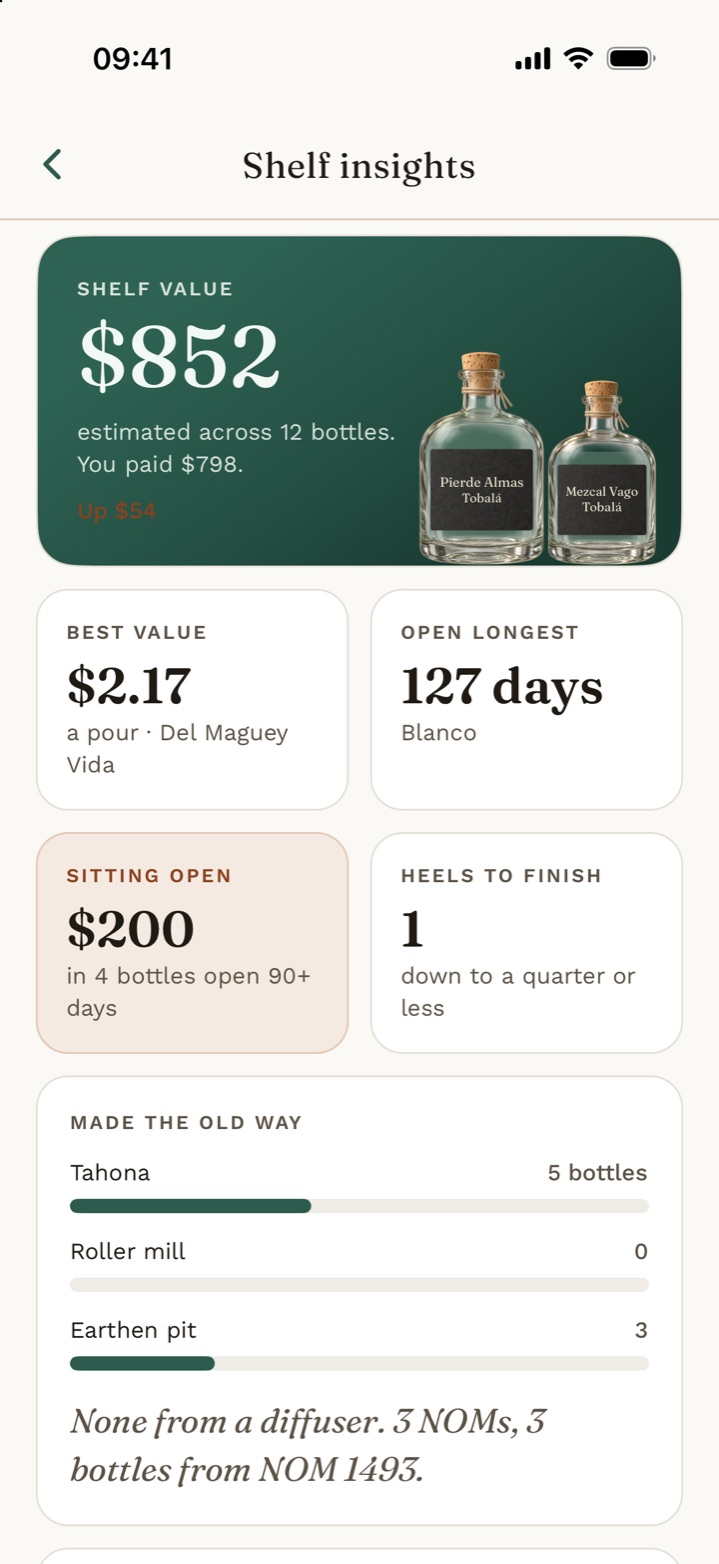
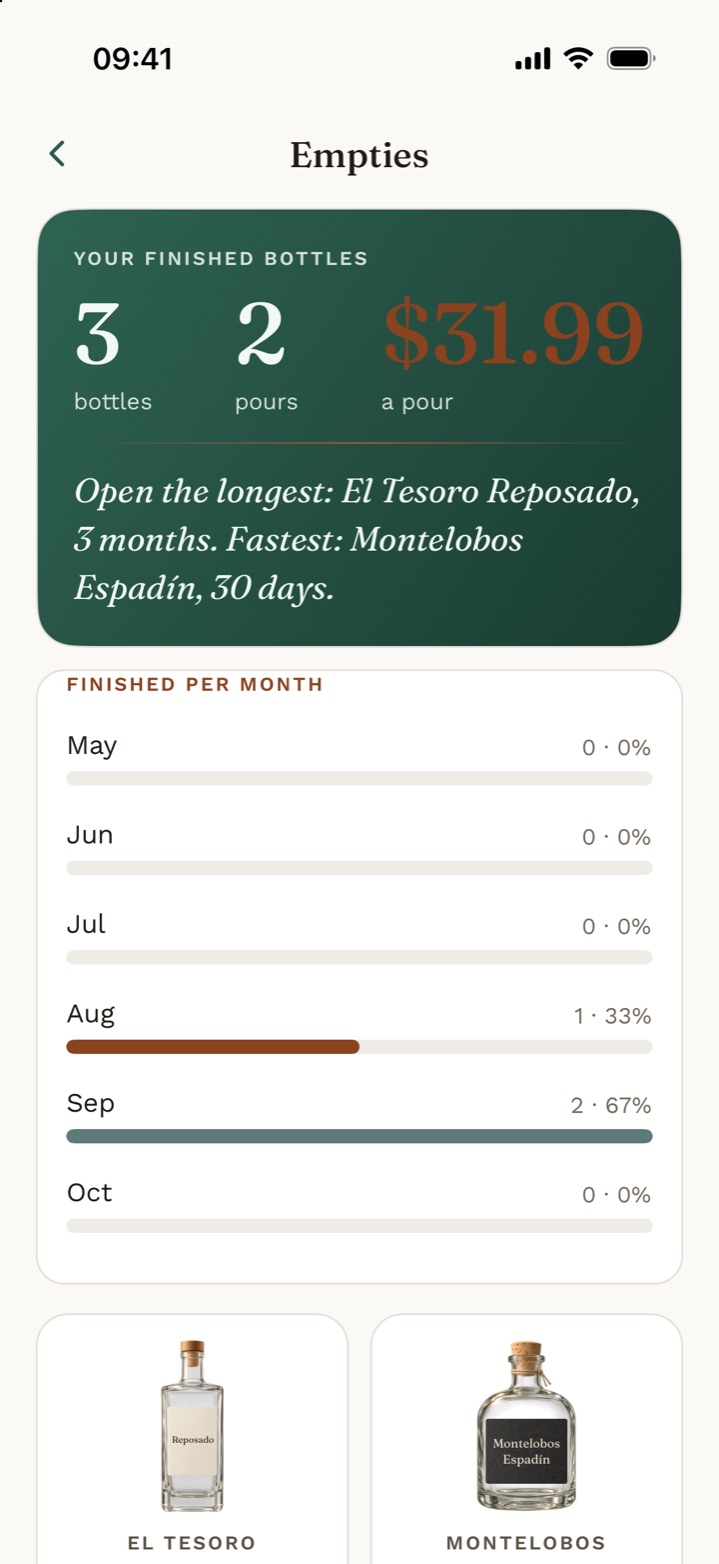
Shelf insights add up what the collection is worth and what you paid, which bottle was the best value, which has been open the longest and which heels to finish. Empties counts up the bottles you finished: how many, how long each lasted and what a pour cost.
VIIIThe hunt list
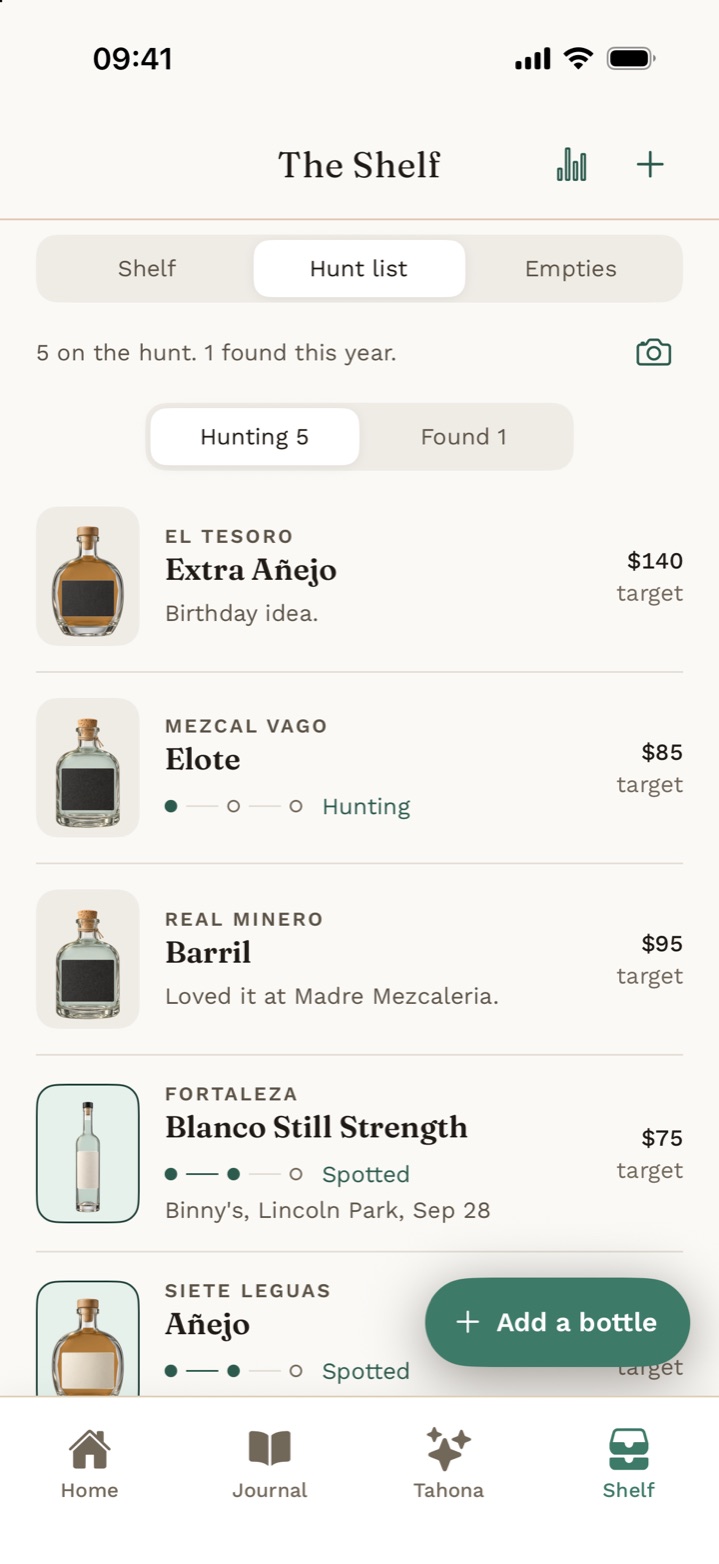
The bottles you are chasing, with a target price and the date and place you last saw one. Found it? It moves onto the Shelf with the facts already filled in. Scan a bar menu and it flags anything on your hunt list.
IXTonight’s Pour
Tell it the occasion and Tahona picks one bottle off your own open Shelf, says why, and names a runner-up. Tonight’s Pour costs three AI credits. Want more than one? Build a flight: three to five pours from your Shelf, in the order to taste them.
XScan the label or the menu
Point the camera at a bottle and the app reads what is printed, then shows you everything it read to correct before it saves. It never fills in a field the label does not state. At a bar, scan the menu instead and it shows what is on your hunt list, what you have already tasted and what you own.
XIYour tools
Home has a grid of tools: Blind flight, Compare, Tier list, Your year, Shelf value, Empties and Import your data. Pro tools show a PRO tag, and Empties and Import are free to open.
XIIStart anywhere
Open the app and start logging without signing up. Create an account when you want your journal kept safe, and what you logged comes with you. Light or dark, your choice, and there are no ads in the app.
Why Agave & Note
Agave spirits carry more of their making on the label than most. Agave & Note records it plainly, and never claims more than it knows.
Your score, your notes, the maguey and the NOM sit together, so months later you have more to go on than a blurry photo.
Your score answers the useful question: would you pour it again?
Tequila can legally carry additives without saying so. So the app never tells you a bottle is additive free. It records that somebody said so, and who: the label, the producer, or you.
No verified badge, and no way to mark a bottle as having additives, because a blank is not evidence.
No feed, no followers, no leaderboard. Your notes are private to your account. Export your journal to CSV whenever you like.
Delete your account from inside the app and it is actually gone.
Pricing
Logging is never gated: every pour, score and note, an unlimited Shelf, the hunt list and importing your spreadsheet are free for as long as you use the app. Tahona, label scans, menu scans, Tonight’s Pour, flights and AI import matching run on AI credits: you get 10 free, Pro includes 25 more, and packs start at $4.99. Pro, paid once, adds insights and your palate report, blind flight and tasting night, collection value and cost per pour, your tier list and year in review, side-by-side compare, photos and color themes, and your full CSV export. Everything we add to the unlock later is yours too.
Free
$0
For keeping track of every pour and every bottle, and trying the guide.
Pro
$14.99once
Includes 25 AI credits
One-time purchase. Restore it any time.
Pay once. Everything in Free, plus more to learn from your Shelf, and everything we add to the unlock later is yours too.
10 free credits to start. A guide question costs 1 credit, a label scan 1, Tonight's Pour 3 and a flight plan 3. Credits never expire.
50 AI credits
110 AI credits
250 AI credits
| CompareEverything you log is yours on either plan. | Free$0The full journal, for good | Pro$14.99 oncePay once. Includes 25 AI credits. |
|---|---|---|
| Journal | ||
| Pours, scores, notes and flavours | Unlimited | Unlimited |
| Production details and the additive claim | ✓ | ✓ |
| Photos on your pours and tastings | ✕ | ✓ |
| Shelf and hunt list | ||
| Bottles on your Shelf | Unlimited | Unlimited |
| Fill levels, prices and bottle history | ✓ | ✓ |
| The hunt list, with "seen at" | ✓ | ✓ |
| Import your spreadsheet | ✓ | ✓ |
| Insights and spend tracking | ✕ | ✓ |
| Your empties counted up | ✕ | ✓ |
| Collection value, cost per pour and keep or trade | ✕ | ✓ |
| Blind flight and tasting night | ✕ | ✓ |
| Your tier list, with the podium, and year in review | ✕ | ✓ |
| Compare bottles side by side | ✕ | ✓ |
| Same NOM insights and a production method filter | ✕ | ✓ |
| CSV export of the Shelf, events and hunt list | ✕ | ✓ |
| Tahona and scanning | ||
| AI credits | 10 to start | 25 included |
| Buy more AI credits (from $4.99, never expire) | ✓ | ✓ |
| Messages with Tahona | 1 credit each | 1 credit each |
| Looks up a specific bottle on the web | ✓ | ✓ |
| Label scans | 1 credit each | 1 credit each |
| Bar menu scans | 2 credits each | 2 credits each |
| AI column match on a spreadsheet import | 1 credit each | 1 credit each |
| Tonight’s Pour | 3 credits | 3 credits |
| Flight plans | 3 credits | 3 credits |
| Your palate report, with its flavor ring | ✕ | ✓ |
| Share your palate as a card, without the watermark | ✕ | ✓ |
| Your data | ||
| A free copy of your data by email | ✓ | ✓ |
| Delete your account and everything in it | ✓ | ✓ |
Ask Tahona anything about tequila, mezcal and the rest. Every answer starts from your own scores and your own Shelf, and a question about one specific bottle gets looked up rather than guessed.
Tell it the mood and it picks one bottle off your own open Shelf.
Three to five pours from what you own, in the order to taste them.
A flavor ring and one line that sums up how you drink, worked out from the pours you have logged. Share it as a card.
Your best bottles on top, ranked by your score or by best value.
What your Shelf is worth, what you have spent by month, which heels to finish and what you have finished.
A label scan is one AI credit, a bar menu scan is two, and Pro adds photos on every pour.
Log first, sign up later. Light or dark, your choice.
Pro is a one-time purchase of $14.99, billed once through your Apple Account, and it can be restored on any device signed in to the same Apple Account. It includes 25 AI credits. AI credits are consumable: you buy them in packs, they never expire and they stay with your account in this app. Prices shown in US dollars; the App Store shows the price in your currency before you buy.
Questions
Agave & Note is available now on the App Store for iPhone.
No. Every pour, score and note, your whole Shelf, your hunt list and importing your spreadsheet are free for as long as you use the app. Tahona, scans and flights run on AI credits, and Pro, paid once, adds Shelf insights, the palate report, blind flight, collection value, your tier list and year in review, compare, photos and themes, and the full CSV export. A free copy of your data is always available by emailing us, unlock or not.
You start with 10 free. A question for Tahona costs 1 credit, a label scan 1, a bar menu scan 2, Tonight’s Pour 3, a flight plan 3, and AI column matching on a spreadsheet import 1. Pro includes 25 credits, and packs of 50, 110 or 250 credits cost $4.99, $9.99 and $19.99. Credits never expire.
No. Pro is a one-time purchase of $14.99. Pay once and keep it, and restore it on a new phone with the same Apple Account.
No, and on purpose. Who verifies what is unsettled, so the app only records that somebody stated a bottle is additive free, and who said it. Tahona will not rule on it either.
No. Agave & Note has no feed, no followers and no leaderboard. Your notes are private to your account, and you can delete the account, and everything in it, at any time.
No. Tahona is an AI guide and it can be wrong. Treat it as a well-read friend, not an authority. It asks before anything is sent to it, and you can keep using the journal without it.
Adults of legal drinking age where they live, and never anyone under 18. The app asks before you can use it. Please drink responsibly.
Free on iPhone. Pro is optional.